Why Does P&ID Software Matter?
A Piping & Instrumentation Diagram (P&ID) is more than just a schematic it’s the blueprint for safe, efficient operations.
The software used to create P&IDs impacts accuracy, revision control, and how well it integrates with other engineering tools. Choosing the right software depends on how often the P&IDs are updated, who needs access, and how tightly your systems integrate. What works for a small, agile plant may not scale well or at all for a multi-site operation.
Three Tiers of P&ID Software
The more complex and frequently updated your processes are, the more advanced software you need.
Tier | Examples | Details | Best Fit |
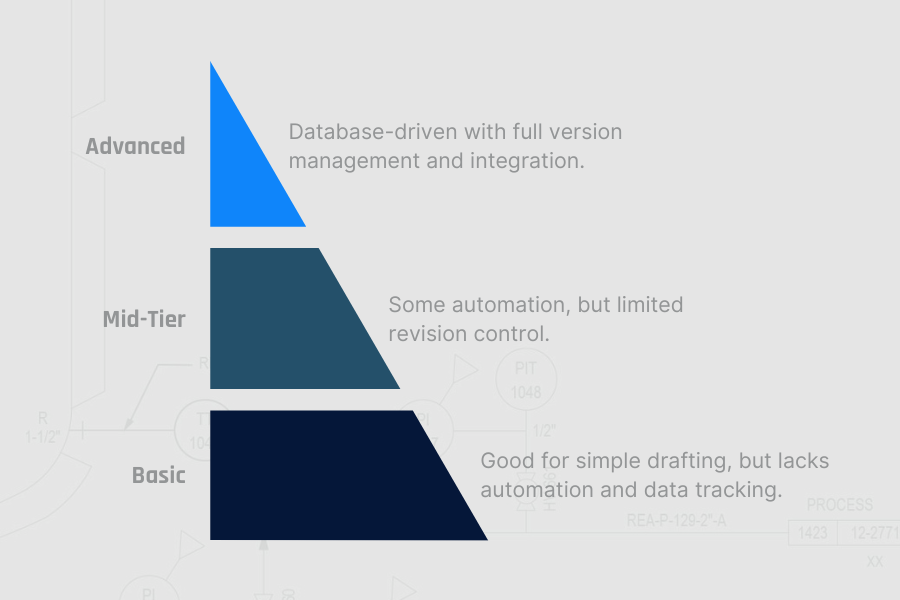
Advanced | SmartPlant P&ID, Bentley OpenPlant | Database-driven with full version management and integration. Integrated databases, strong revision control. Enables large team collaboration and data syncing. | Complex facilities with frequent changes and compliance demands |
Mid-Tier | AutoCAD Plant 3D | Some automation, but limited revision control. Some automation, symbol libraries. Moderate version control. | Plants with modest complexity or limited team sharing |
Basic | AutoCAD | Good for simple drafting, but lacks automation and data tracking. Great for small teams or static systems. Manual updates, minimal automation. | Simple projects with low update frequency |
Matching The Tool To The Task
When Software Falls Short
A plant using basic drafting software may struggle to keep P&IDs updated across multiple projects. Conflicting versions can lead to errors in piping modifications, causing costly rework.
When Software Fits
After switching to a database-driven P&ID tool, your team can streamline project updates, improve documentation accuracy, and reduce rework. The tool supports your team’s workflow, scales when you need it to, and integrates where it counts.
When Software Goes Too Far
Advanced software has its place in more complex facilities, but requires training, maintenance, and expensive licensing for features that you may not need or don’t make sense for your facility’s usage and workforce.
A mismatch between software capabilities and team needs can lead to either costly workarounds or costly overhead.
Key Considerations When Selecting P&ID Software
Question | Why It Matters | Software Recommendation |
How often will your process change? | If updates are frequent, choose software with version control to prevent errors. | Frequent updates → Version control essential |
Will multiple teams update the same P&IDs? | Collaboration-friendly software ensures consistency across projects. | Multiple teams → Collaboration features needed |
What’s your team’s technical skill level? | Complex software requires training investment and technical expertise to maximize value. | Limited technical resources → User-friendly tools preferred |
How important is integration with existing systems? | Standalone tools may create data silos; integrated solutions streamline workflows. | Multiple engineering systems → Integration capabilities essential |
What’s your long-term growth plan? | Software that works today may not scale with facility expansion or increased complexity. | Growth planned → Scalable solutions recommended |
How critical is real-time collaboration? | Remote teams and simultaneous updates require robust collaboration features. | Distributed teams → Cloud-based collaboration needed |
What’s your tolerance for implementation time? | Advanced systems require longer setup periods and change management. | Quick deployment needed → Simpler tools preferred |
Common Mistakes When Choosing P&ID Software
Relying on basic drafting tools: Lack of version control leads to outdated, conflicting documents.
Ignoring revision control: Multiple teams making updates without a structured process creates errors.
Overcommitting to 2D/3D integration: While appealing in theory, integrated systems often require significant training and maintenance investment that may not justify the value for many operations.
Choosing based on cost alone: Cheaper software may work short-term but often leads to higher long-term labor and inefficiency costs.
Over-buying on features: Paying for advanced capabilities you won’t use wastes resources and adds unnecessary complexity.
Choosing software without an implementation plan: Advanced tools require proper training, maintenance, and ongoing support to deliver value.
The Bottom Line
The right P&ID software improves efficiency, ensures compliance, and supports consistent documentation.
The key is matching software capabilities to your actual operational needs. Basic tools work well for simple, static systems. Advanced tools with automation and version control deliver major benefits for complex facilities—but only when paired with a clear implementation plan and commitment to proper utilization.
At C-P Systems, we can help teams objectively evaluate P&ID software options based on how they actually operate. We support implementation, maintenance, and ensure documentation processes align with operations.
Learn More at c-psystems.com/services/piping-design/